
Programming Hotmoka
A tutorial on Hotmoka and smart contracts in Takamaka
2.4 Creation of a first account
We need an account in the test network, that we will use later to pay for installing code in blockchain and for running transactions. An account in Hotmoka is something completely different from an account in other blockchains. For instance, in Bitcoin and Ethereum, accounts do not really exist, in the sense that they are just an address derived from a private key, that can be used to control information in blockchain. Their creation does not trigger any operation in blockchain: it is performed completely off-chain. Instead, in Hotmoka, an account is a Java object, more precisely an instance of the io.takamaka.code.lang.ExternallyOwnedAccount class. That object must be allocated (created) in the memory of the Hotmoka node, before it can be used. Moreover, such an object is not special in any way: for instance, as for all other objects in the storage of the node, we must pay for its creation. Currently, we have no accounts and consequently no coins for paying the creation of a new object. We could earn coins by mining for the network, or as payment for some activity, or by buying coins at an exchange. Since this is a test network, we can more simply use the faucet of the gamete instead, that is willing to send us up to 10000000000000000 coins, for free. Namely, you can run the following commands in order to create a key pair and then ask the faucet to create your first externally owned account for that key pair, funded with 50000000000000 coins, initially, paid by the faucet. Execute the following commands inside a hotmoka_tutorial directory of your home, so that moka will save the key pair of your account there, which will simplify your subsequent work:
moka keys create --name=account1.pem --password
Enter value for --password (the password that will be needed later to use the key pair): chocolate
The new key pair has been written into "account1.pem":
* public key: 4jhU3sVPjNahrbkNwufsPpsZZriVkwD5CqXXnccsucNp (ed25519, base58)
* public key: N4M10bcl8sr2KLzdDN70HB+171L5J5CPOLCi9XklWD0= (ed25519, base64)
* Tendermint-like address: F7481FC045754202D0814ED6922120980701E9C6
We can now create an account that uses the key pair, letting the faucet pay for it:
moka accounts create faucet 50000000000000 account1.pem --password --uri ws://panarea.hotmoka.io:8001
Enter value for --password (the password of the key pair): chocolate
A new account 7f4ad9db011016b852cc1bedeee43905bbd53470a4eac211b2647798e331661d#0 has been created.
Its key pair has been saved into the file "7f4ad9db011016b852cc1bedeee43905bbd53470a4eac211b2647798e331661d#0.pem".


Gas consumption:
 * total: 60112
   * for CPU: 15870
   * for RAM: 7282
   * for storage: 36960
   * for penalty: 0
 * price per unit: 4 panas
 * total price: 240448 panas
Storage reference 7f4ad9db011016b852cc1bedeee43905bbd53470a4eac211b2647798e331661d#0 refers to the newly created account object.
This reference will be different in your machine.
This storage reference is a machine-independent pointer to your account Java object, inside the node. Moreover, a random sequence of bits, called entropy, has been generated and saved into a .pem file. From that entropy, and the chosen password, it is possible to derive private and (hence) public key of the account. This is why we use key pair to refer to such .pem file. You should keep the .pem file secret since, together with the password of the account (in our case, we have chosen chocolate), it allows its owner to control your account and spend its coins. Note that the password is not written anywhere: if you lose it, it cannot be recovered.
Let us check that our account really exists, by querying the node about the state of the object allocated at 7f4ad9db011016b852cc1bedeee43905bbd53470a4eac211b2647798e331661d#0:
moka objects show 7f4ad9db011016b852cc1bedeee43905bbd53470a4eac211b2647798e331661d#0 --uri ws://panarea.hotmoka.io:8001
class io.takamaka.code.lang.ExternallyOwnedAccountED25519 (from jar installed at 68e90e2868751a3f22fd5fad3ceef377b91b3e52fdd30705f57505e22902ce40)
  io.takamaka.code.lang.Contract.balance:java.math.BigInteger = 50000000000000
  io.takamaka.code.lang.ExternallyOwnedAccount.nonce:java.math.BigInteger = 0
  io.takamaka.code.lang.ExternallyOwnedAccount.publicKey:java.lang.String = "N4M10bcl8sr2KLzdDN70HB+171L5J5CPOLCi9XklWD0="
Note that the balance and the public key of the account are fields of the account object. Moreover, note that Hotmoka knows which is the class of the object at that address (it is a class named io.takamaka.code.lang.ExternallyOwnedAccountED25519) and where that class is defined: inside the jar at 68e90e2868751a3f22fd5fad3ceef377b91b3e52fdd30705f57505e22902ce40, that is, the jar that defines the basic Takamaka classes (Fig. 2.3). We will call Takamaka code that address.
This is completely different from what happens, for instance, in Ethereum, where externally owned accounts and contract references and untyped at run time, so that it is not possible to reconstruct their class in a reliable way. Moreover, note that we have been able to create an object in blockchain without sending the bytecode for its code: that bytecode was already installed, at Takamaka code, and we do not need to repeat it every time we instantiate an object. Instead, the new object will refer to the jar that contains its bytecode.
In the following, you can use the moka objects show command on any object, not just on your own accounts, whenever you want to inspect its state (that includes the state inherited from its superclasses).
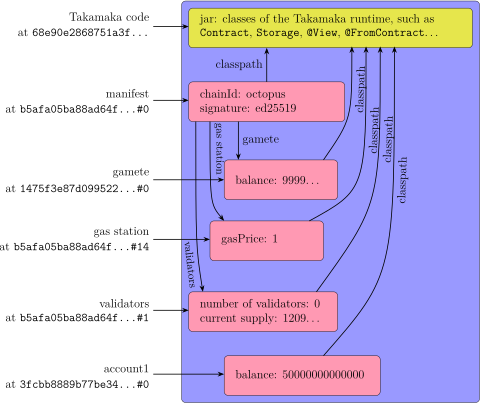
Fig. 2.5 shows the state of the network nodes after the creation of our new account. Since out test node is part of a blockchain, it is not only its state that has been modified, but also that of all nodes that are part of that blockchain.
Whenever your account will run out of coins, you can recharge it with the moka send command, by using, again, the faucet as source of coins. Namely, if you want to recharge your account with 200000 extra coins, you can type:
moka accounts send faucet 200000 7f4ad9db011016b852cc1bedeee43905bbd53470a4eac211b2647798e331661d#0 --uri=ws://panarea.hotmoka.io:8001
Adding transaction 661d03b14ccf70e2a6d7aba9114c9007d610047e6142e06279bd0efc2e98f464... done.
You can then use the moka objects show command to verify that the balance of your account has been actually increased with 200000 extra coins.
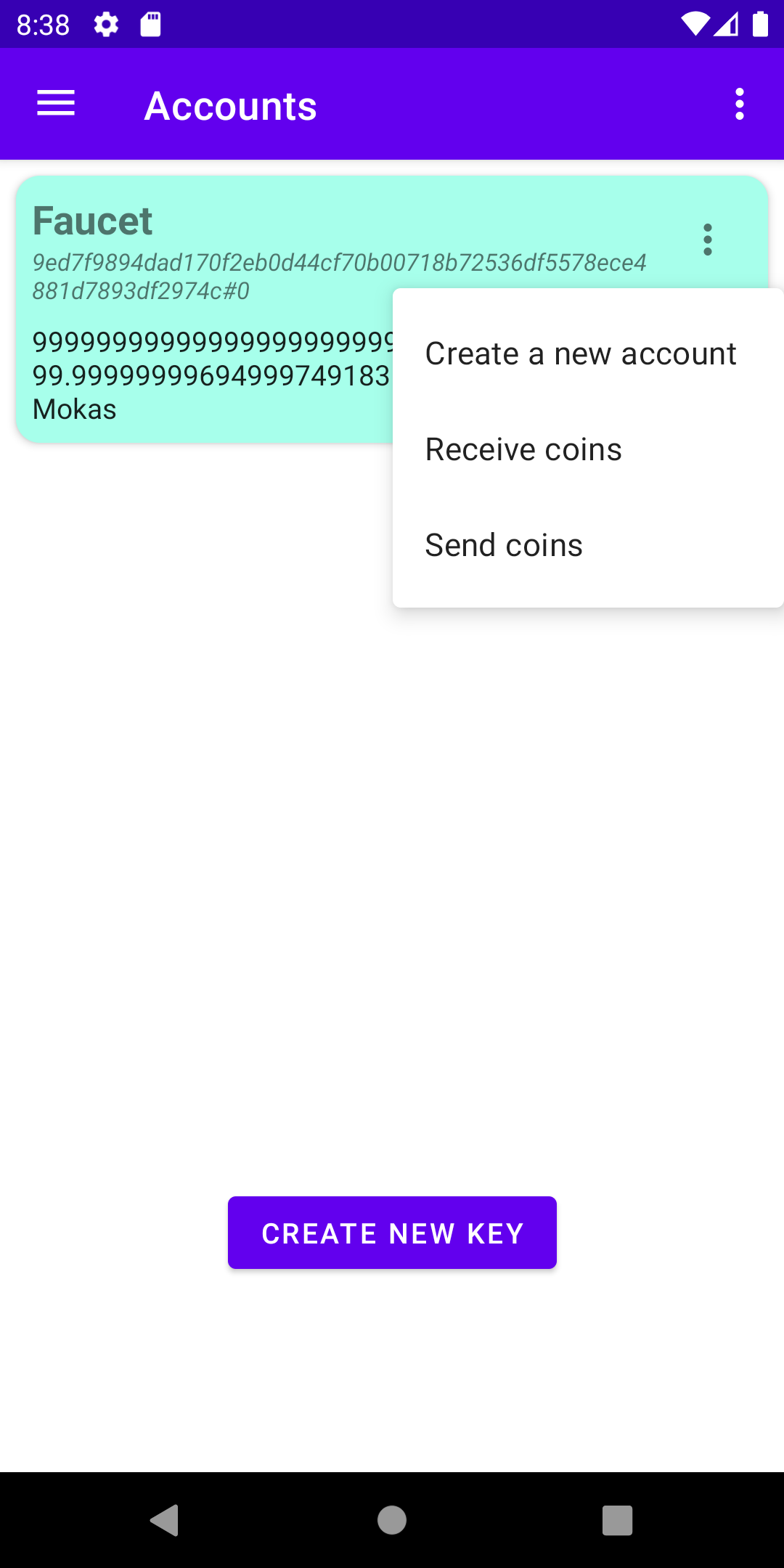
The creation of a new account from the faucet is possible from the Mokito app as well. Namely, use the menu of the app to tap on the Accounts item to see the list of available accounts (Fig. 2.2). From there, tap on the menu icon on the right of the Faucet account and select Create a new account (see Fig. 2.6a).
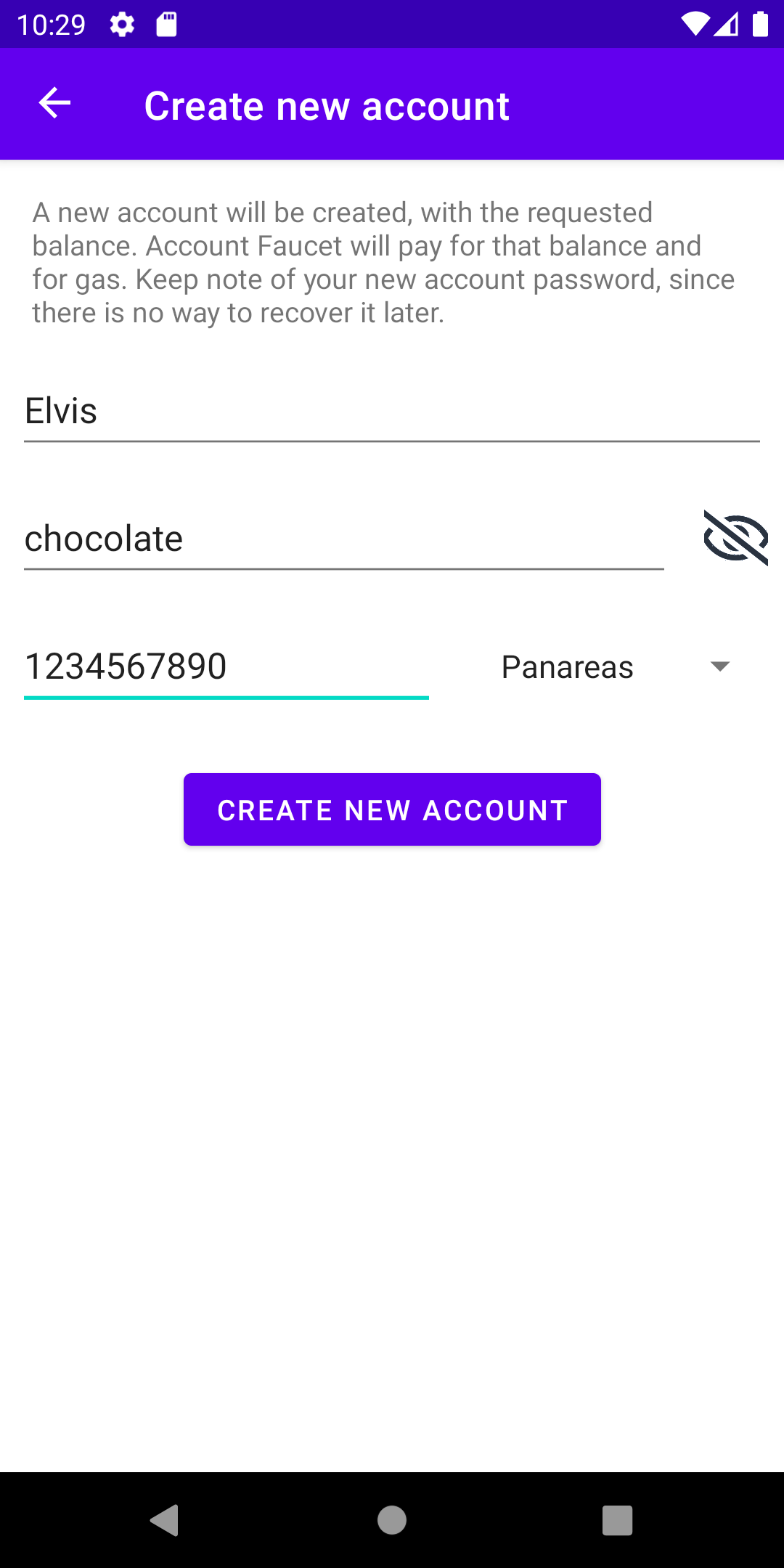
A form will appear, where you can specify the name for the account, its password and the initial balance (that will be paid by the faucet). For instance, you can fill it as in Fig. 2.6b.
The name of the accounts is a feature of Mokito to simplify the identification of the accounts. However, keep in mind that accounts have no name in Hotmoka: they are just identified by their storage reference. For instance, moka currently does not allow one to associate names to accounts.
After tapping on the Create new account button, the new account will be created and its information will be shown, as in Fig. 2.7a. Note, in this screen, the storage reference of the new account and the presence of a 36 words passphrase.
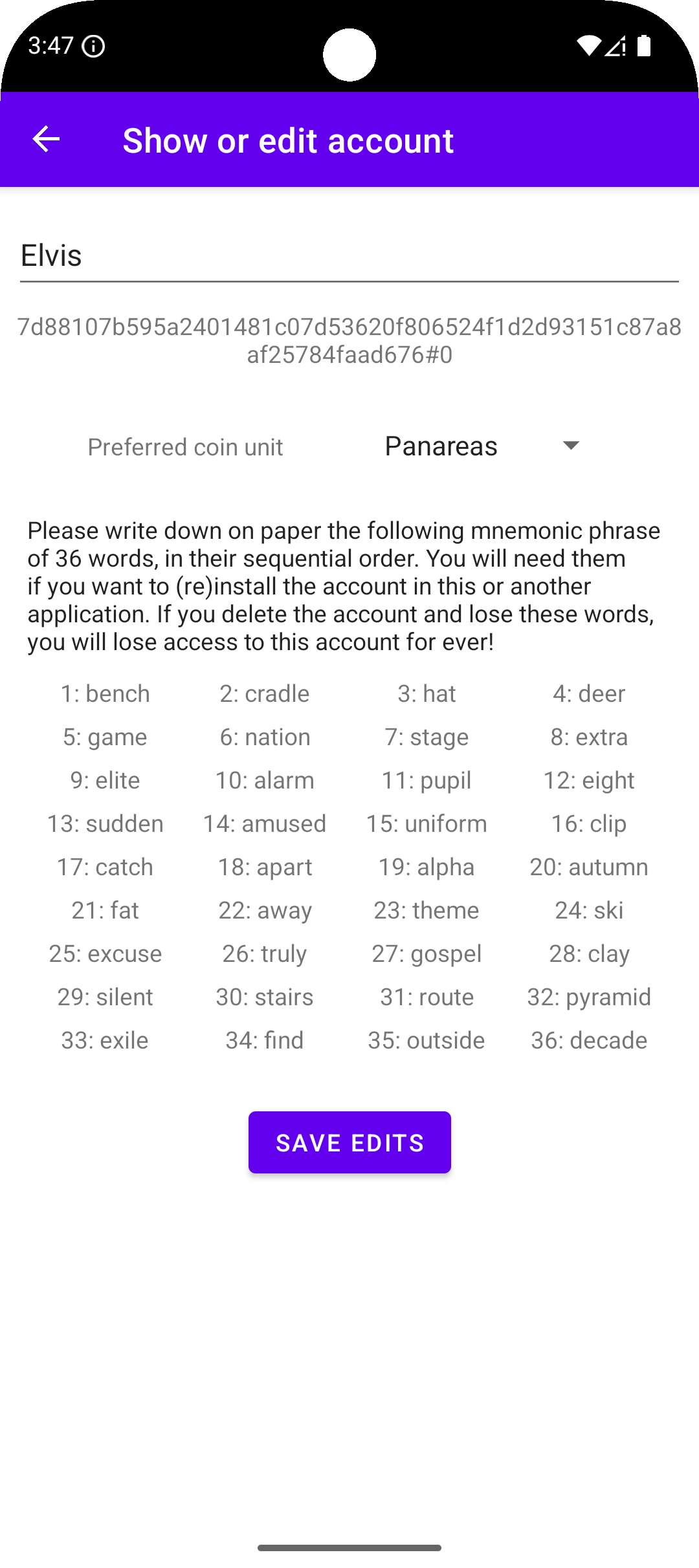
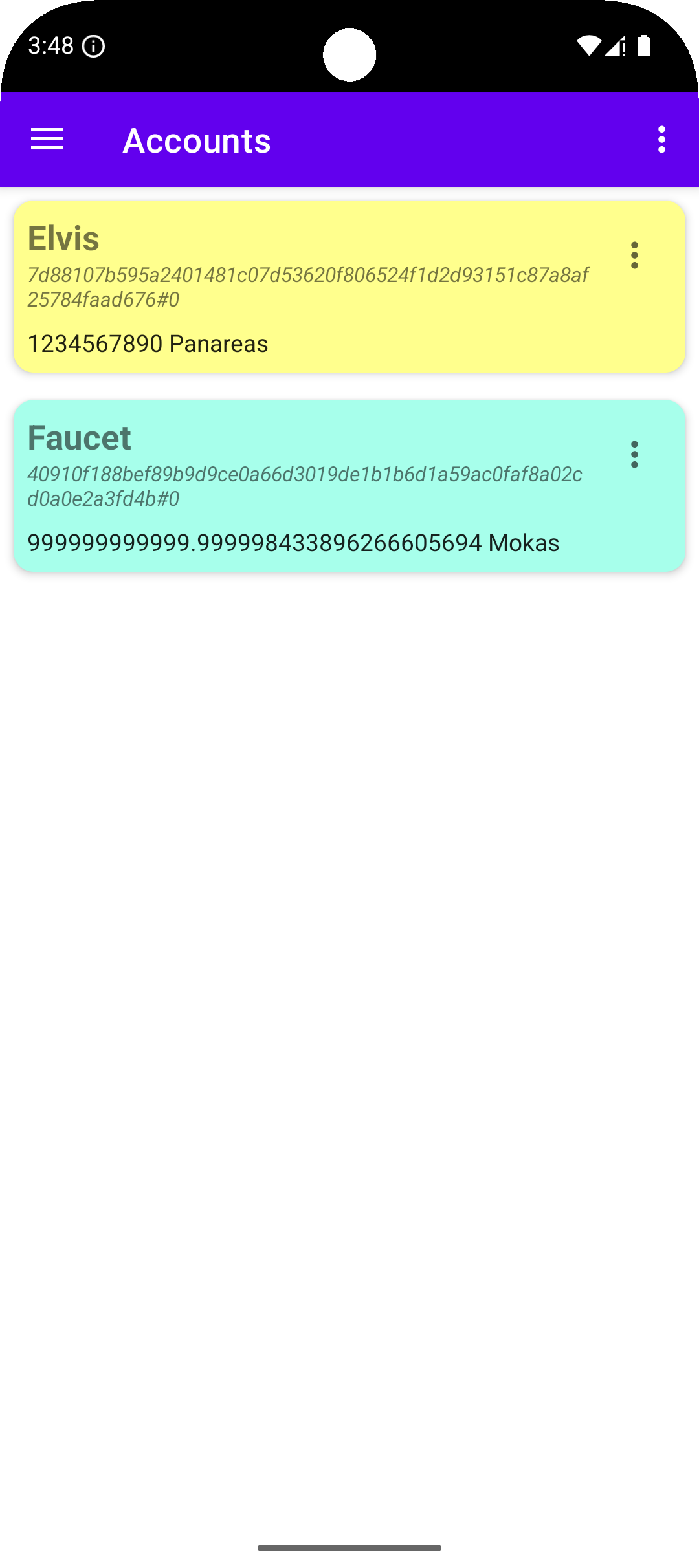
If you go back to the accounts screen (by using the top-left menu of Mokito), you will see that Elvis has been added to your accounts (see Fig. 2.7b).
We used chocolate as password of the new key pair. You can use your preferred password instead, or just leave it blank. In any case, you should be consistent to use the same password later, when we’ll use the key pair.