
Programming Hotmoka
A tutorial on Hotmoka and smart contracts in Takamaka
2.2 Hotmoka clients
In order to query a Hotmoka node, handle accounts and run transactions on the node, one needs a client application. Currently, there is a command-line client, called moka and a mobile client for Android, called Mokito. Mokito provides basic functionalities only (handling accounts, querying the state of the objects in the node, running simple transactions), while moka is the most complete solution.
2.2.1 Moka
You can use moka to interact with an existing Hotmoka node, install code in the node and run transactions. There are two ways of using moka. You can either use moka inside a docker container provided by the Hotmoka developers. Or you can download its source code, compile it and add the moka executable to the command path of your machine. This latter approach is more flexible but requires to have Java JDK version 21 (or higher) installed in your computer, along with a recent version of Maven. The former approach avoids to install and compile software on your machine, beyond having docker installed of course. Moreover, many operations become ackward with docker, because, for instance, files created inside a docker container remain there, unless explicitly copied out of there. Both alternatives are described in the following paragraphs, but our suggested solution is to compile and install moka in your machine.
Invoking moka from inside a docker container
There are a few docker containers providing moka and all the machinery for running Hotmoka nodes. They are maintained in DockerHub [10]. For instance, you can query the provided version of moka as follows:
docker run -it --rm hotmoka/mokamint-node:1.12.3 moka --version
You should see 1.12.3 answered on the screen. You do need Java nor Maven for this, nor to compile anything: docker will take care of downloading the image of the container and run moka inside it.
You can also contact an existing Hotmoka node and query the current state of an object, allocated at a given storage reference, such as the payer account of Fig. 2.1:
docker run -it --rm hotmoka/mokamint-node:1.12.3 moka objects show 7f4ad9db011016b852cc1bedeee43905bbd53470a4eac211b2647798e331661d#0 --uri ws://panarea.hotmoka.io:8001
The output will be something like:
class io.takamaka.code.lang.ExternallyOwnedAccountED25519 (from jar installed at 68e90e2868751a3f22fd5fad3ceef377b91b3e52fdd30705f57505e22902ce40)
  io.takamaka.code.lang.Contract.balance:java.math.BigInteger = 50000000000000
  io.takamaka.code.lang.ExternallyOwnedAccount.nonce:java.math.BigInteger = 0
  io.takamaka.code.lang.ExternallyOwnedAccount.publicKey:java.lang.String = "N4M10bcl8sr2KLzdDN70HB+171L5J5CPOLCi9XklWD0="
Note that the classpath (the jar installed at…) corresponds to what reported in Fig. 2.1, since it is an immutable property of an object.
Invoking moka in the local machine
In order to invoke moka directly, in the local machine, one needs to download its code, compile it and extend the path of the shell so that it finds the compiled code. Below, it is shown how to perform this on a Linux machine.
Let us install the code in the ~/Gits directory of our machine, with the following sequence of commands. We assume that you have both Git and Maven installed already:
mkdir -p ~/Gits
cd ~/Gits
git clone --branch v1.12.3 https://github.com/Hotmoka/hotmoka
cd hotmoka
mvn clean install -DskipTests
Then edit your .bashrc configuration file and add at its end the following command, that expands the command path of the shell:
export PATH=~/Gits/hotmoka/io-hotmoka-moka/src/main/bash:$PATH
Exit the terminal and spawn a new one. You should be able to run moka directly now. For instance, you can run the same commands of Sec. 2.2.1, but without the help of docker:
moka --version
moka objects show 7f4ad9db011016b852cc1bedeee43905bbd53470a4eac211b2647798e331661d#0 --uri ws://panarea.hotmoka.io:8001
In the rest of this book, we will normally show direct invocations of moka, outside of a docker container. Remember, however, that you can also run it from inside its docker container if you prefer.
Getting help about moka’s commands
If you want help about the commands of moka, just use the help command. Namely, moka help will print on the screen the following help lines:
This is the command-line interface of Hotmoka.
Usage: moka [--version] [COMMAND]
      --version print version information and exit
Commands:
  help Display help information about the specified command.
  accounts Manage Hotmoka accounts.
  jars Manage jars of Takamaka classes.
  keys Manage cryptographic keys.
  nodes Manage Hotmoka nodes.
  objects Manage Hotmoka objects.
  transactions Manage Hotmoka transactions.
Copyright (c) 2021 Fausto Spoto (fausto.spoto@hotmoka.io)
You can see that commands are organized in groups. You can get help about a specific group by prefixing help to the name of the group. For instance, the moka help objects command will print:
Manage Hotmoka objects.
Usage: moka objects [COMMAND]
Commands:
  help Display help information about the specified command.
  call Call a method of an object or class.
  create Create a storage object.
  show Show the state of a storage object.
You can print the help of a specific leaf command by prefixing help before it. For instance, the command moka objects help show will show information about the show subcommand of the objects group of commands of moka. It will print:
Show the state of a storage object.
Usage: moka objects show [--api] [--json] [--redirection=<path>]
                           [--timeout=<milliseconds>] [--uri=<uri>] <object>
      <object> the object
      --api print the public API of the object
      --json print the output in JSON
      --redirection=<path> the path where the output must be redirected, if
                                    any; if missing, the output is printed to the
                                    standard output
      --timeout=<milliseconds>
                                  the timeout of the connection
                                    Default: 90000
      --uri=<uri> the network URI where the API of the Hotmoka node
                                    service is published
                                    Default: ws://localhost:8001
2.2.2 Mokito
The moka tool allows one to perform a large variety of operations on a Hotmoka node. However, it is a technical tool, meant for developers. Most users will only perform simple tasks with a Hotmoka node. For them, it is simpler to use a mobile app, with a simpler user interface. Such an app, called Mokito, is currently available for Android only. You can download it from Google Play and install it in your device, from [18]. Its Kotlin source code is available at [17], together with a small Android service for connecting to a remote Hotmoka node.
The first time you will use Mokito on your mobile device, it will connect to a default Hotmoka node and show the screen in Fig. 2.2. The server can be changed in the settings section of the app, accessible through the menu in the top left area of the app.
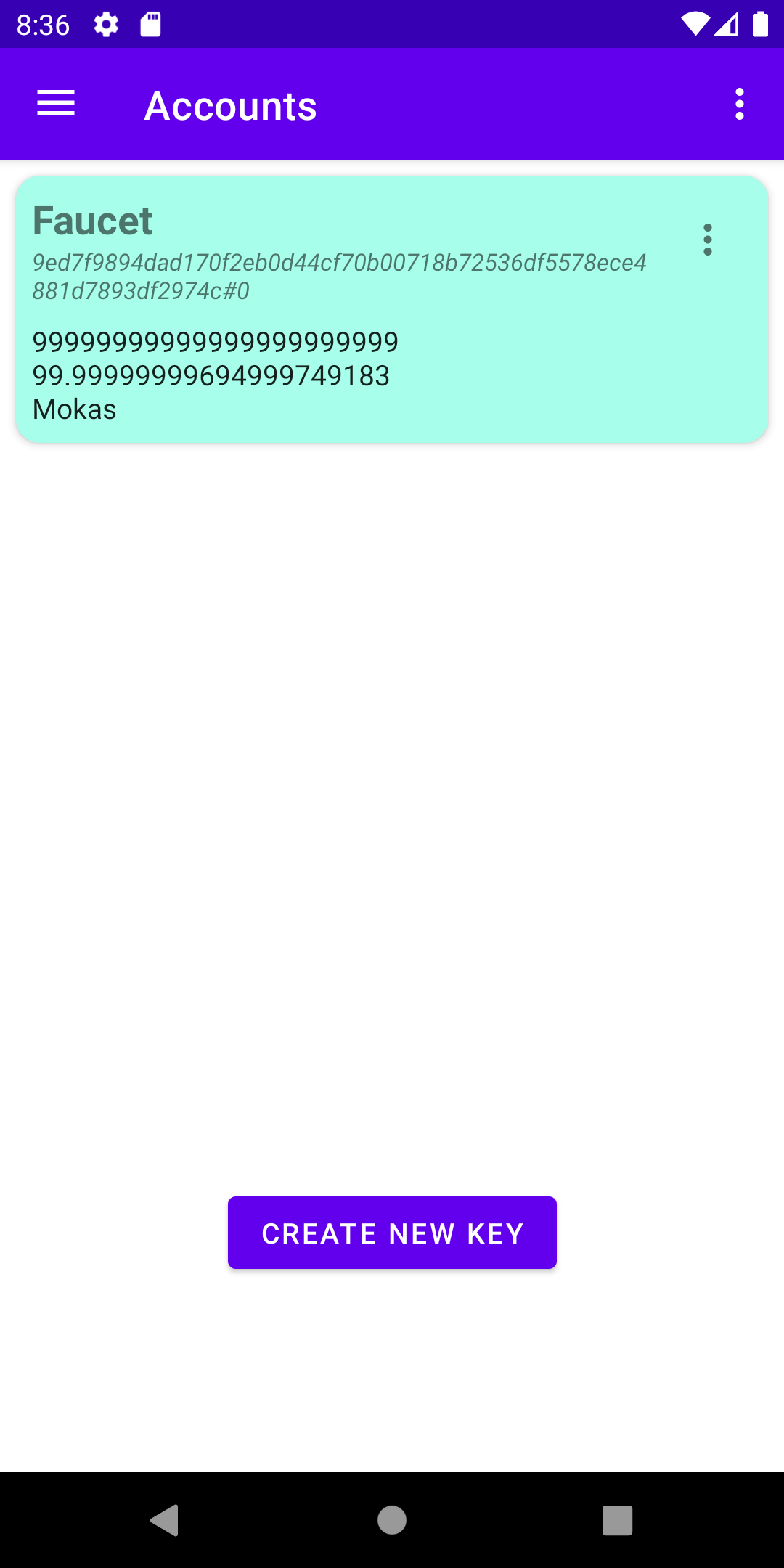
You can see in Fig. 2.2 that Mokito shows a faucet account, that only exists in test networks and that can be used for funding the creation of new accounts. We will do this with moka in the next section, but you can do it from Mokito as well. In Mokito, you can also create keys, pay to keys, show the manifest of the contacted node, show and navigate objects in the state of the node. This should all be intuitive.
The default Hotmoka node used by Mokito might be different in different versions of the app. For the experiments that follow, we assume that you are connected to a node of a test network, for instance to ws://panarea.hotmoka.io:8001. Check that is the case in the settings page of the app, and change the node if needed.