
Programming Hotmoka
A tutorial on Hotmoka and smart contracts in Takamaka
Chapter 8 Hotmoka nodes
A Hotmoka node is a device that implements an interface for running Java code remotely. It can be any kind of device, such as a device of an IoT network, but also a node of a blockchain. We have already used instances of Hotmoka nodes, namely, instances of RemoteNode. But there are other examples of nodes, that we will describe in this chapter.
The interface io.hotmoka.node.api.Node is shown in the topmost part of Fig. 8.1. That interface can be split in five parts:
-
1. A get part, that includes methods for querying the state of the node and for accessing the objects contained in its store.
-
2. An add part, that expands the store of the node with the result of a transaction.
-
3. A run part, that runs transactions that execute @View methods and hence do not expand the store of the node.
-
4. A post part, that expands the store of the node with the result of a transaction, without waiting for its result; instead, a future is returned.
-
5. A contextual part, that allows users to subscribe listeners of events generated during the execution of the transactions, or to subscribe listeners called when the node gets closed, or to close the node itself.
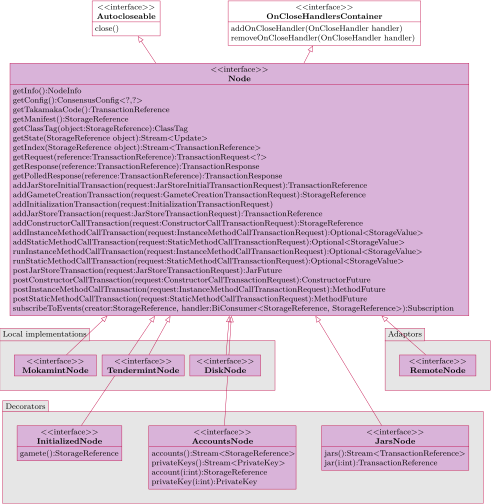
If a node belongs to a blockchain, then all nodes of the blockchain have the same vision of the state, so that it is equivalent to call a method on a node or on any other node of the network. The only methods that are out of consensus, since they deal with information specific to each node, are getInfo(), that returns specific information about the node, and the four contextual methods subscribeToEvents(), addOnCloseHandler(), removeOnCloseHandler() and close().
Looking at Fig. 8.1, it is possible to see that the Node interface has many implementations, that we describe below.
- Local implementations.
-
These are actual nodes that run on the machine where they have been started. For instance, they can be a node of a larger blockchain network. Among them, MokamintNode implements a node of a Mokamint blockchain (Sec. 7.2); TendermintNode implements a node of a Tendermint blockchain (Sec. 7.3) and will be presented in Sec. 8.1; DiskNode implements a single-node blockchain in disk memory: this is useful for debugging, testing and learning, since it allows one to inspect the content of blocks, transactions and store; it will be presented in Sec. 8.2. Local nodes can be instantiated through the static factory methods of their supplier classes MokamintNodes, TendermintNodes and DiskNodes. Those methods requires to specify parameters that are specific to the given node of the network that is being started and can be different from node to node (MokamintNodeConfig and similar). Some implementations have to ability to resume. This means that they recover the state at the end of a previous execution, reconstruct the consensus parameters from that state and resume the execution from there, downloading and verifying blocks already processed by the network.
- Decorators.
-
The Node interface is implemented by some decorators as well. Typically, these decorators run some transactions on the decorated node, to simplify some tasks, such as the initialization of the node, the installation of jars into the node or the creation of accounts in the node. These decorators are views of the decorated node, in the sense that any method of the Node interface, invoked on the decorator, is forwarded to the decorated node, with the exception of the contextual methods that are executed locally on the specific node where they are invoked. We will discuss them in Sec. 8.4.
- Adaptors.
-
Very often, one wants to publish a node online, so that he (and other programmers who need its service) can use it concurrently. This should be possible for all implementations of the Node interface, such as DiskNode, MokamintNode, TendermintNode and all present and future implementations. In other words, one would like to publish any Hotmoka node as a service, accessible through the internet. This will be the subject of Sec. 8.5. Conversely, once a Hotmoka node has been published at some URI, say ws://my.company.com, it will be accessible through a network connection. This complexity might make it complex, for a programmer, to use the published node. In that case, we can create an instance of the node that operates as a proxy to the network service, helping programmers integrate their software to the service in a seamless way. This remote node still implements the Node interface, but simply forwards all its calls to the remote service (with the exception of the contextual methods, that are executed locally on the remote node itself). By programming against the same Node interface, it becomes easy for a programmer to swap a local node with a remote node, or vice versa. This mechanism is described in Sec. 8.6, where the adaptor interface RemoteNode in Fig. 8.1 is presented.
8.1 Tendermint nodes
This section shows how you can start your own Hotmoka Tendermint node, consisting of a single validator node, hence part of its own blockchain. The process is not difficult but is a bit tedious, because it requires one to install Tendermint and to create its configuration files. Sec. 7.3 provides a simpler alternative for reaching the same goal, by using docker.
In order to use a Tendermint Hotmoka node, the Tendermint executable must be installed in our machine, or our experiments will fail. The Hotmoka node works with Tendermint version 0.34.15, that can be downloaded in executable form from https://github.com/tendermint/tendermint/releases/tag/v\tendermintVersion. Be sure that you download the executable for the architecture of your computer and install it at a place that is part of the command-line path of your computer. You can then verify that Tendermint is correctly installed:
tendermint version
0.34.15
Before starting a local node of a Hotmoka blockchain based on Tendermint, you need to create the Tendermint configuration file. For instance, in order to run a single validator node with no non-validator nodes, you can create its configuration files as follows:
tendermint testnet --v 1 --n 0
I[2026-06-10|17:57:56.389] Generated private validator module=main keyFile=mytestnet/node0/config/priv_validator_key.json stateFile=mytestnet/node0/data/priv_validator_state.json
I[2026-06-10|17:57:56.389] Generated node key module=main path=mytestnet/node0/config/node_key.json
I[2026-06-10|17:57:56.389] Generated genesis file module=main path=mytestnet/node0/config/genesis.json
Successfully initialized 1 node directories
This has created a directory mytestnet/node0 for a single Tendermint node, that includes the configuration of the node and its private and public validator keys.
Once this is done, you can create a key pair for the gamete of the node that you are going to start. This is an account that holds all initial crypto coins, if any. You perform this with moka:
moka keys create --name=gamete.pem --password
Enter value for --password (the password that will be needed later to use the key pair): mypassword
The new key pair has been written into "gamete.pem":
* public key: 45G2xPgcUoqJTxpp3iKhva67cpZfjUR1UmzF5U2PNE83 (ed25519, base58)
* public key: Laph93em9g3PZwfjS4NYNfJ4lGtEBq0pgd8kpG+aGXQ= (ed25519, base64)
* Tendermint-like address: 5D740FC55EBFB15DA4EF6F1EBC5E31A0C30DD149
You can start now a Hotmoka node based on Tendermint, that uses the Tendermint configuration directory that you have just created, and with a gamete controlled by the gamete.pem key pair, by using the moka nodes tendermint init command. You need to specify the jar of the runtime of Takamaka, that will be stored inside the node as takamakaCode: we use the local Maven’s cache for that but you can alternatively download the io.takamaka-code-1.8.1.jar file from Maven and refer to it in the following command line:
moka nodes tendermint init ~/.m2/repository/io/hotmoka/io-takamaka-code/1.8.1/io-takamaka-code-1.8.1.jar --public-key-of-gamete=45G2xPgcUoqJTxpp3iKhva67cpZfjUR1UmzF5U2PNE83 --tendermint-config=mytestnet/node0
The following service has been published:
 * ws://localhost:8001: the API of this Hotmoka node


The validators are the following accounts:
 * 5b5e4dfd20a3869e9aa337ad79602b0099541c2428867708c379d463c769e305#0 with public key BgKreKrPdFcadj6T7sBYCPt9pmKxqBFJygcLXdF3HL3p (ed25519, base58)


The owner of the key pair of the gamete can bind it now to its address with:
  moka keys bind file_containing_the_key_pair_of_the_gamete --password --url url_of_this_Hotmoka_node
or with:
  moka keys bind file_containing_the_key_pair_of_the_gamete --password --reference c413e49ced77f001ec43db9fc47774321a7efc71cdbd4fca3cec6aab578fe3dc#0


Press the enter key to stop this process and close this node:
This command has done a lot! It has created an instance of TendermintNode; it has stored the io-takamaka-code-1.8.1.jar file inside it; it has created a Java object, called manifest, that contains other objects, including an externally-owned account gamete, whose public key is that provided with --public-key-of-gamete; it has initialized the balance of the gamete to the a default initial supply. Finally, this command has published an internet service at the URI ws://localhost:8001, reachable through websocket connections, that exports the API of the node.
By default, moka nodes tendermint init publishes the service at port 8001. This can be changed with its --port option. Moreover, it uses a default initial supply for the gamete that can be changed with the --initial-supply option. Finally, it uses a Hotmoka chain identifier identical to that of the underlying Tendermint network, specified inside the Tendermint configuration files created by tendermint testnet. If you want to override it, you can either edit such configuration files or use the --chain-id option (in the latter case, the chain identifiers of Hotmoka and Tendermint may be different, which is perfectly fine).
In order to use the gamete, you should bind its key to its actual storage reference in the node, on your local machine. Open another shell, move inside the directory holding the keys of the gamete and run:
moka keys bind gamete.pem --password
Enter value for --password (the password of the key pair): mypassword
The key pair of c413e49ced77f001ec43db9fc47774321a7efc71cdbd4fca3cec6aab578fe3dc#0 has been saved as "c413e49ced77f001ec43db9fc47774321a7efc71cdbd4fca3cec6aab578fe3dc#0.pem
This operation has created a pem file whose name is that of the storage reference of the gamete. With this file, it is possible to run transactions on behalf of the gamete.
You do not need the --uri option above, since ws://localhost:8001 is the default URI for moka.
Your computer exports a Hotmoka node now, running on Tendermint. You can verify this with moka nodes manifest show. Moreover, if your computer is reachable at some address my.machine and if its 8001 port is open to the outside world, then anybody can contact your node at ws://my.machine:8001, query your node and run transactions on it. However, what has been created is a Tendermint node where all initial coins are inside the gamete. By using the gamete, you can fill the node with objects and accounts now, and in general run all transactions you want. However, other users, who do not know the keys of the gamete, will not be able to run any non-@View transaction on your node. If you want to open a faucet, so that other users can gain droplets of coins (see examples in Sec. 2.4), you must add the --open-unsigned-faucet option to the moka nodes tendermint init command above. If you do that, you can then go into another shell (since the previous one is busy with the execution of the node), in a directory holding the key pair file of the gamete, and type:
moka nodes faucet 5000000 --password
Enter value for --password (the password of the key pair): mypassword
The threshold of the faucet has been set
This set the maximal amount of coins that the faucet is willing to give away at each request (its flow). You can re-run the moka nodes faucet command many times, in order to change the flow of the faucet, or close it completely. Needless to say, only the owner of the keys of the gamete can run the moka nodes faucet command, which is why the key pair file of the gamete must be in the directory where you run it.
After opening a faucet with a sufficient flow, anybody can re-run, for instance, the examples of Ch. 2 by replacing ws://panarea.hotmoka.io:8001 with ws://my.machine:8001: your computer will serve the requests and run the transactions.
If you turn off your Hotmoka node based on Tendermint, its state remains saved inside the chain directory: the chain/tendermint subdirectory is where Tendermint stores the blocks of the chain; while chain/hotmoka contains the Xodus database, consisting of the storage objects created in blockchain. Try for instance to stop the Tendermint node that we initialized before (press enter in the window where it was running). You can subsequently resume that node from its latest state, by typing:
moka nodes tendermint resume
The following service has been published:
 * ws://localhost:8001: the API of this Hotmoka node


Press the enter key to stop this process and close this node:
There is a log file that can be useful to check the state of our Hotmoka-Tendermint node. Namely, tendermint.log contains the log of Tendermint itself. It can be interesting to inspect which blocks are committed and when:
I[2025-06-11|10:13:24.143] Version info, module=main
  tendermint_version=@tendermint_version block=11 p2p=8
I[2025-06-11|10:13:24.169] Started node module=main
  nodeInfo="{ProtocolVersion:{P2P:8 Block:11 App:0}
I[2025-06-11|10:13:25.234] executed block module=state
  height=630 num_valid_txs=2 num_invalid_txs=0
I[2025-06-11|10:13:25.408] committed state module=state
  height=630 num_txs=0
  app_hash=A30F89457141AB7E94F71456871396FD9D30CA8E9F66998C6E3E3079D40849F
In this log, the block height increases and the application hash changes, reflecting the fact that the state has been modified.
8.1.1 Shared entities
This section describes how the set of validators is implemented in Hotmoka. Namely, the validation power of the network is expressed as a total quantity shared among all validator nodes. For instance, when we have shown the manifest of the nodes (moka nodes manifest show), we have seen information about the only validator in the subsequent form:
validator #0: b437832a688dbb89b145d380b7cb3eb841d7cb09fb600d27be43cd670e8b43f9#0
  id: 030203B36BA4EDF0182D7D40D7EA7FE34A9415B4
  balance: 1568
  staked: 4704
  power: 1000000
This means that validator #0 has a power of 1000000. If it were the only validator of the network, also the total power of the validators of the network would be 1000000. A validator can decide to sell part of its power or all its power to another validator, resulting in a network with a single (different) validator or with more validators. For instance, it might sell 200000 units of power to another validator #1, resulting in a network with two validators: validator #0 with 800000 units of power and validator #1 with 200000 units of power.
What said above means that the set of validators are a sort of entity that shares validation power among the single validators. Validation power can be sold and bought. The number of validators and their power is consequently dynamic. In some sense, this mechanism resembles the market of shares of a corporation.
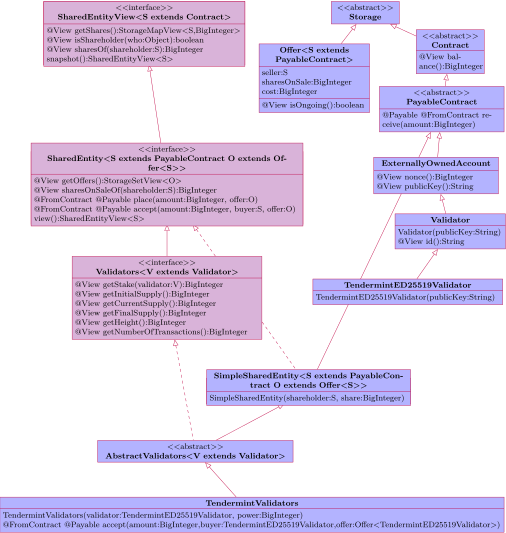
Hotmoka has an interface that represents entities whose shares can be dynamically sold and bought among shareholders (see also [29]). Fig. 8.2 shows this SharedEntity interface. As you can see in the figure, the notion of validators is just a special case of shared entity. It is possible to use shared entities to represent other concepts, such as a distributed autonomous organization, or a voting community. Here, however, we focus on their use to represent the set of the validators of a proof of stake blockchain.
In general, two concepts are specific to each implementation of shared entities: who are the potential shareholders and how offers for selling shares work. Therefore, two generic types specify the interface
SharedEntity
The SharedEntity subinterface adds methods for transfer of shares. It includes an inner class Offer that models sale offers: it specifies who is the seller of the shares, how many shares are being sold, the requested price and the expiration of the offer. Method isOngoing() checks if an offer has not expired yet. Implementations can subclass Offer if they need more specific offers. Offers can be placed on sale by calling the place() method with a sale offer. This method is annotated as @FromContract since the caller must be identified as the owner of the shares (or otherwise anybody could sell the shares of anybody else) and as @Payable so that implementations can require to pay a ticket to place shares on sale. The sale offer is passed as a parameter to place(), hence it must have been created before calling that method. The set of all sale offers is available through getOffers(). Method sharesOnSaleOf() yields the cumulative number of shares on sale for a given shareholder. Who wants to buy shares calls method accept() with the accepted offer and with itself as buyer and becomes a new shareholder or increases its cumulative number of shares (if it was already a shareholder). Also this method is @Payable, since its caller must pay ticket >= offer.cost coins to the seller. This means that shareholders must be able to receive payments and that is why S extends PayableContract. The SimpleSharedEntity class implements the shared entity algorithms, that subclasses can redefine if they want.
Hotmoka models validator nodes as objects of class Validator, that are externally owned accounts with an extra identifier (Fig. 8.2). In the specific case of a Hotmoka blockchain built over Tendermint, validators are instances of the subclass TendermintED25519Validator, whose identifier is derived from their ed25519 public key. This identifier is public information, reported in the blocks and easy to eavesdrop. The Validators interface in Fig. 8.2 extends the SharedEntity interface, fixes the shareholders to be instances of Validator and adds a method getStake() that yields the amount of coins at stake for each given validator (if the validator misbehaves, its stake will be slashed).
The AbstractValidators class implements the set of validators and the distribution of the reward and is a subclass of SimpleSharedEntity (Fig. 8.2). Shares are voting power in this case. It has a subclass for each kind of Hotmoka node, so that the distribution of the reward at each block creation can be implemented differently in each node type. Namely, there exist subclasses TendermintValidators, MokamintValidators and DiskValidators. The first subclass restricts the type of the validators to be TendermintED25519Validator. At each block committed, Hotmoka calls the reward method of such subclasses in order to reward the validators (if any) that behaved correctly and slash those that misbehaved, possibly removing them from the set of validators. Moreover, such methods are responsible for minting new coins at each block creation. In the case of Tendermint nodes, at block creation time, Hotmoka calls method getShares() and informs the underlying Tendermint engine about the identifiers of the validator nodes for the next blocks. Tendermint expects such validators to mine and vote the subsequent blocks, until a change in the set of validators occurs.
We strongly suggest you to use docker to install Hotmoka nodes, instead of the instructions in this section, hence please follow the instructions in Sec. 7.3. The current section only exists in order to understand what happens inside the docker container. If you are not a developer, or if you are not interested in the topic, you can safely skip this section.