
Programming Hotmoka
A tutorial on Hotmoka and smart contracts in Takamaka
3.2 Installation of a jar in a Hotmoka node
(See the io-hotmoka-tutorial-examples-runs project in https://github.com/Hotmoka/hotmoka)
We have generated the jar containing our code and we want to send it now to a Hotmoka node, where it will be installed. This means that it will become available to programmers who want to use its classes, directly or as dependencies of their programs. In order to install a jar in the Hotmoka node that we have used in the previous chapter, we can use the moka command-line tool, specifying which account will pay for the installation of the jar. The cost of the installation depends on the size of the jar and on the number of its dependencies. The moka tool uses a heuristics to foresee this cost, that can be overridden if needed.
Move inside the hotmoka_tutorial directory, if you are not there already, so that moka will find your saved key pair there, and run the moka jars install command:
moka jars install 7f4ad9db011016b852cc1bedeee43905bbd53470a4eac211b2647798e331661d#0 io-hotmoka-tutorial-examples-family/target/io-hotmoka-tutorial-examples-family-1.12.3.jar --yes --password-of-payer --uri=ws://panarea.hotmoka.io:8001
Enter value for --password-of-payer (the password of the key pair of the payer account): chocolate
The jar has been installed at 5a57544d67487e050116cbb2bdf05d22b2758ab074189d431016b861359bd4e6.


Gas consumption:
 * total: 443089
   * for CPU: 15353
   * for RAM: 5176
   * for storage: 422560
   * for penalty: 0
 * price per unit: 1 pana
 * total price: 443089 panas
As you can see above, the jar has been installed at a reference 5a57544d67487e05…, that can be used later to refer to that jar. This has costed some gas, paid by our account. You can verify that the balance of the account has been decreased, through the moka objects show command.
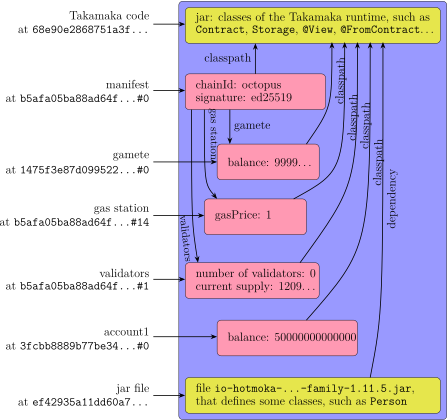
The state of the Hotmoka nodes of the network is now as in Fig. 3.3. As shown there, a dependency has been automatically created from io-hotmoka-tutorial-examples-family-1.12.3.jar to io-takamaka-code-1.8.1.jar. This is because all Takamaka code will use the run-time classes of the Takamaka language, hence the moka jars install command adds them, by default. That command allows to explicitly specify other dependencies, for more complicated uses. Note that a dependency must already be installed in the node before it can be used as dependency of other jars.
What we have done above is probably enough for most users, but sometimes you need to perform the same operation in code, for instance in order to implement a software application that connects to a Hotmoka node and runs some transactions. Therefore, we describe below how you can write a Java program that installs the same jar in the Hotmoka node, without using the moka jars install command. A similar translation in code can be performed for all examples in this tutorial, but we will report it only for a few of them.
Let us hence create another Eclipse Maven project io-hotmoka-tutorial-examples-runs, inside the directory hotmoka_tutorial, exactly as we did in the previous section for the family project. Specify Java 21 (or later) in its build configuration. Use io.hotmoka as Group Id and io-hotmoka-tutorial-examples-runs as Artifact Id. This is specified in the following pom.xml, that you should copy inside the io-hotmoka-tutorial-examples-runs project, replacing that generated by Eclipse:
<project xmlns="http://maven.apache.org/POM/4.0.0"
  xmlns:xsi="http://www.w3.org/2001/XMLSchema-instance"
  xsi:schemaLocation="http://maven.apache.org/POM/4.0.0 http://maven.apache.org/xsd/maven-4.0.0.xsd">


  <modelVersion>4.0.0</modelVersion>
  <groupId>io.hotmoka</groupId>
  <artifactId>io-hotmoka-tutorial-examples-runs</artifactId>
  <version>|\hotmokaVersion{}|</version>


  <properties>
    <project.build.sourceEncoding>UTF-8</project.build.sourceEncoding>
    <maven.compiler.release>21</maven.compiler.release>
  </properties>


  <build>
    <plugins>
      <plugin>
         <groupId>org.apache.maven.plugins</groupId>
         <artifactId>maven-compiler-plugin</artifactId>
         <version>3.11.0</version>
      </plugin>
    </plugins>
  </build>


  <dependencies>
    <dependency>
      <groupId>io.hotmoka</groupId>
      <artifactId>io-hotmoka-node-remote</artifactId>
      <version>|\hotmokaVersion{}|</version>
    </dependency>
    <dependency>
      <groupId>io.hotmoka</groupId>
      <artifactId>io-hotmoka-helpers</artifactId>
      <version>|\hotmokaVersion{}|</version>
    </dependency>
    <dependency>
      <groupId>io.hotmoka</groupId>
      <artifactId>io-hotmoka-node-tendermint</artifactId>
      <version>|\hotmokaVersion{}|</version>
    </dependency>
    <dependency>
      <groupId>io.hotmoka</groupId>
      <artifactId>io-hotmoka-node-disk</artifactId>
      <version>|\hotmokaVersion{}|</version>
    </dependency>
    <dependency>
      <groupId>io.hotmoka</groupId>
      <artifactId>io-hotmoka-node-service</artifactId>
      <version>|\hotmokaVersion{}|</version>
    </dependency>
    <dependency>
      <groupId>io.hotmoka</groupId>
      <artifactId>io-hotmoka-constants</artifactId>
      <version>|\hotmokaVersion{}|</version>
    </dependency>
    <dependency>
      <groupId>io.hotmoka</groupId>
      <artifactId>io-takamaka-code-constants</artifactId>
      <version>|\takamakaVersion{}|</version>
    </dependency>
  </dependencies>


</project>
This pom.xml specifies a few dependencies. We do not need all of them now, but we will need them along the next sections, hence let us insert them all already. These dependencies get automatically downloaded from the Maven repository.
Since we have just modified the file pom.xml, Eclipse could show an error for the project io-hotmoka-tutorial-examples-runs. To fix it, you need to update the Maven dependencies of the project:
right-click on the io-hotmoka-tutorial-examples-runs project and then select the menu Maven Update Project…
Create a module-info.java inside src/main/java, containing:
module io.hotmoka.tutorial.examples.runs {
    requires io.hotmoka.helpers;
    requires io.hotmoka.node.remote;
    requires io.hotmoka.node.disk;
    requires io.hotmoka.node.tendermint;
    requires io.hotmoka.node.service;
    requires io.hotmoka.constants;
    requires io.takamaka.code.constants;
}
Again, we do not need all such dependencies already, but we will need them later.
Create a package io.hotmoka.tutorial.examples.runs inside src/main/java and add the following class Family.java inside it:
package io.hotmoka.tutorial.examples.runs;


import static java.math.BigInteger.ONE;


import java.math.BigInteger;
import java.net.URI;
import java.nio.file.Files;
import java.nio.file.Path;
import java.nio.file.Paths;
import java.security.KeyPair;


import io.hotmoka.constants.Constants;
import io.hotmoka.crypto.api.Signer;
import io.hotmoka.helpers.GasHelpers;
import io.hotmoka.helpers.SignatureHelpers;
import io.hotmoka.node.Accounts;
import io.hotmoka.node.MethodSignatures;
import io.hotmoka.node.StorageValues;
import io.hotmoka.node.TransactionRequests;
import io.hotmoka.node.api.Node;
import io.hotmoka.node.api.requests.SignedTransactionRequest;
import io.hotmoka.node.api.transactions.TransactionReference;
import io.hotmoka.node.api.values.StorageReference;
import io.hotmoka.node.remote.RemoteNodes;


public class Family {


    public static void main(String[] args) throws Exception {


        // the path of the user jar to install
        var familyPath = Paths.get(System.getProperty("user.home")
            + "/.m2/repository/io/hotmoka/io-hotmoka-tutorial-examples-family/"
            + Constants.HOTMOKA_VERSION
            + "/io-hotmoka-tutorial-examples-family-" + Constants.HOTMOKA_VERSION + ".jar");


        var dir = Paths.get(args[1]);
        var payer = StorageValues.reference(args[2]);
        var password = args[3];


        try (var node = RemoteNodes.of(new URI(args[0]), 150000)) {
            // we get a reference to where io-takamaka-code-X.Y.Z.jar has been stored
            TransactionReference takamakaCode = node.getTakamakaCode();


            // we get the signing algorithm to use for requests
            var signature = node.getConfig().getSignatureForRequests();


            KeyPair keys = loadKeys(node, dir, payer, password);


            // we create a signer that signs with the private key of our account
            Signer<SignedTransactionRequest<?>> signer = signature.getSigner
            (keys.getPrivate(), SignedTransactionRequest::toByteArrayWithoutSignature);


            // we get the nonce of our account: we use the account itself as caller and
            // an arbitrary nonce (ZERO in the code) since we are running
            // a @View method of the account
            BigInteger nonce = node
            .runInstanceMethodCallTransaction(TransactionRequests.instanceViewMethodCall
            (payer, // payer
            BigInteger.valueOf(100_000), // gas limit
            takamakaCode, // class path for the execution of the transaction
            MethodSignatures.NONCE, // method
            payer)).get() // receiver of the method call
            .asBigInteger(__ -> new ClassCastException());


            // we get the chain identifier of the network
            String chainId = node.getConfig().getChainId();
            var gasHelper = GasHelpers.of(node);


            // we install the family jar in the node: our account will pay
            TransactionReference family = node
            .addJarStoreTransaction(TransactionRequests.jarStore
            (signer, // an object that signs with the payer's private key
            payer, // payer
            nonce, // payer's nonce: relevant since this is not a call to a @View method!
            chainId, // chain identifier: relevant since this is not a call to a @View method!
            BigInteger.valueOf(1_000_000), // gas limit: enough for this small jar
            gasHelper.getSafeGasPrice(), // gas price: at least the current gas price of the network
            takamakaCode, // class path for the execution of the transaction
            Files.readAllBytes(familyPath), // bytes of the jar to install
            takamakaCode)); // dependencies of the jar that is being installed


            // we increase our copy of the nonce, ready for further
            // transactions having the account as payer
            nonce = nonce.add(ONE);


            System.out.println("jar installed at " + family);
        }
    }


    private static KeyPair loadKeys(Node node, Path dir, StorageReference account, String password) throws Exception {
        return Accounts.of(account, dir)
        .keys(password, SignatureHelpers.of(node).signatureAlgorithmFor(account));
    }
}
As you can see, the above main method requires four values to be provided from the caller: the server to contact, the directory dir where the key pair of the payer account can be found, the storage reference of that payer account, and the password of the key pair.
The code above creates an instance of a RemoteNode, that represents a Hotmoka node installed in a remote host. By specifying the URI of the host, the RemoteNode object exposes all methods of a Hotmoka node. It is an AutoCloseable object, hence it is placed inside a try-with-resource statement that guarantees its release at the end of the try block. By using that remote node, our code collects some information about the node: the reference to the io-takamaka-code jar already installed inside it (takamakaCode) and the signature algorithm used by the node, that it uses to construct a signer object that signs with the private key of our account, loaded from disk.
The loadKeys method accesses the .pem file that we have previously created with moka, that should be inside a directory dir.
Like every Hotmoka node, the observable state of the remote node can only evolve through transactions, that modify its state in an atomic way. Namely, the code above performs two transactions:
-
1. A call to the nonce() method of our account: this is a progressive counter of the number of transactions already performed with our account. It starts from zero, but our account has been already used for other transactions (through the moka tool). Hence we better ask the node about it. As we will see later, this transaction calls a @View method. All calls to @View methods have the nice feature of being for free: nobody will pay for them. Because of that, we do not need to sign this transaction, or to provide a correct nonce, or specify a gas price. The limitation of such calls is that their transactions are not checked by consensus, hence we have to trust the node we ask. Moreover, they can only read, never write the data in the store of the node.
-
2. The addition of our jar in the node. This time the transaction has a cost and our account is specified as payer. The signer of our account signs the transaction. The nonce of our account and the chain identifier of the network are relevant, as well as the gas price, that must at least match that of the network. The code uses the addJarStoreTransaction() method, that executes a new transaction on the node, whose goal is to install a jar inside it. The jar is provided as a sequence of bytes (Files.readAllBytes(familyPath), where familyPath looks inside the local Maven repository of the machine, where the jar to install in the node should already be present). The request passed to addJarStoreTransaction() specifies that the transaction can cost up to
 units of gas, that can be bought at the price returned by the gasHelper object. The request specifies that its class path is node.getTakamakaCode(): this is the reference to the
io-takamaka-code jar already installed in the node. Finally, the request specifies that io-hotmoka-tutorial-examples-family-1.12.3.jar has only a single dependency:
io-takamaka-code. This means that when, later, we will refer to io-hotmoka-tutorial-examples-family-1.12.3.jar in a class path, this class path will indirectly include its dependency
io-takamaka-code as well (see Fig. 3.3).
units of gas, that can be bought at the price returned by the gasHelper object. The request specifies that its class path is node.getTakamakaCode(): this is the reference to the
io-takamaka-code jar already installed in the node. Finally, the request specifies that io-hotmoka-tutorial-examples-family-1.12.3.jar has only a single dependency:
io-takamaka-code. This means that when, later, we will refer to io-hotmoka-tutorial-examples-family-1.12.3.jar in a class path, this class path will indirectly include its dependency
io-takamaka-code as well (see Fig. 3.3).
You can run the program with Maven, specifying the server to contact, the directory where the key pairs can be found, the payer account and its password:
mvn compile exec:java -Dexec.mainClass="io.hotmoka.tutorial.examples.runs.Family" -Dexec.args="ws://panarea.hotmoka.io:8001 hotmoka_tutorial 7f4ad9db011016b852cc1bedeee43905bbd53470a4eac211b2647798e331661d#0 chocolate"
jar installed at 1714feeaa9f2f943b379a2a5f272faa3510c3ae88408807659ec6e94d15a4806
The exact address where the jar gets installed will change in your machine. In any case, note that this reference to the jar is functionally equivalent to that obtained before with the moka jars install command: they point to equivalent jars.
As in Ethereum, transactions in Hotmoka are paid in terms of gas consumed for their execution. Calls to @View methods do not actually modify the state of the node and are executed locally, on the node that receives the request of the transaction. Hence, they can be considered as run for free. Instead, we have used an actual gas price for the last transaction that installs the jar in blockchain. This could be computed with a sequence of calls to @View methods (get the manifest, then the gas station inside the manifest, then the gas price inside the gas station). In order to simplify the code, we have used the GasHelper class, that does exactly that for us.