
Programming Hotmoka
A tutorial on Hotmoka and smart contracts in Takamaka
7.3 Hotmoka blockchains based on Tendermint (proof of stake)
Tendermint [31], now Ignite, is a Byzantine-fault tolerant engine for building blockchains, that replicates a finite-state machine on a network of nodes across the world. The finite-state machine is often referred to as a Tendermint app. The nice feature of Tendermint is that it takes care of all issues related to networking and consensus, leaving to the developer only the task to develop the Tendermint app.
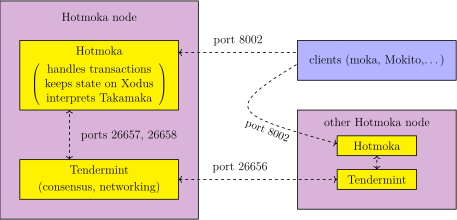
There is a docker image that implements a Hotmoka node as a Tendermint app for programming in Takamaka over Tendermint. We have already used that node previously, since that installed at ws://panarea.hotmoka.io:8002 is a node of that type. Fig. 7.4 shows the architecture of a Tendermint Hotmoka node. It consists of a few components. The Hotmoka component is the Tendermint app that implements the transactions on the state, that is the installation of jars and the execution of code written in the Takamaka subset of Java. This part is the same in every implementation of a Hotmoka node, not only for this one based on Tendermint. The database that contains the state is implemented by using the Xodus transactional database by IntelliJ. What is specific here, however, is that transactions are put inside a blockchain implemented by Tendermint. The communication occurs, internally, through the two TCP ports 26657 and 26658, that are the standard choice of Tendermint for communicating with an app. Clients can contact the Hotmoka node through any port, typically but not exclusively 8001 or 8002, as a websocket service. The node can live alone but is normally integrated with other Hotmoka nodes based on Tendermint, so that they execute and verify the same transactions, reaching the same state at the end. This happens through the TCP port 26656, that allows Tendermint instances to gossip: they exchange transactions and information on peers and finally reach consensus. Each node can be configured to use a different port to communicate with clients, which is useful if, for instance, ports 8001 or 8002 (or both) are already used by some other service. Port 26656 must be the same for all nodes in the network, since they must communicate on a standard port.
As shown in Fig. 7.4, clients connect to the Hotmoka part of any node of the blockchain. The exact node is irrelevant, since all nodes of the same blockchain are kept synchronized by the underlying Tendermint engine. For instance, we can use ws://panarea.hotmoka.io:8002 to play with accounts and Takamaka contracts. However, we might want to install our own node instead, part of the same blockchain network of ws://panarea.hotmoka.io:8002 or part of a brand new blockchain. In the former case, our own node will execute the same transactions of ws://panarea.hotmoka.io:8002, so that we can be sure that they are executed according to the rules. In the latter case, we can have our own blockchain that executes our transactions only, instead of using a shared blockchain such as that at ws://panarea.hotmoka.io:8002.
7.3.1 Start a node of an existing blockchain
As for Hotmoka nodes based on Mokamint 7.2.4, this task is split in two scripts, config-clone and go.
Configure the node (config-clone)
The config-clone script creates the configuration directory of a node that joins an existing Hotmoka blockchain based on the Tendermint byzantine consensus engine. For that, you must specify the URI of a node of
this blockchain, from where the configuration information will be fetched, such as ws://panarea.hotmoka.io:8002. This is important, since all nodes of the same
blockchain must have the same consensus parameters. You must also specify the average block creation rate of the blockchain, that in the case of ws://panarea.hotmoka.io:8002 is  milliseconds. We will use two volumes: chain will contain the actual blockchain data and hotmoka_tendermint will contain the configuration information created for the node. By using
volumes, we can share that information across successive invocations of docker.
milliseconds. We will use two volumes: chain will contain the actual blockchain data and hotmoka_tendermint will contain the configuration information created for the node. By using
volumes, we can share that information across successive invocations of docker.
You can then run the script that configures the node.
docker run -it --rm -e HOTMOKA_PUBLIC_SERVICE_URI=ws://panarea.hotmoka.io:8002 -e TARGET_BLOCK_CREATION_TIME=10000 -v chain:/home/hotmoka/chain -v hotmoka_tendermint:/home/hotmoka/hotmoka_tendermint hotmoka/tendermint-node:1.12.3 config-
clone
The script above will create a key pair with empty password, that will be kept inside the container. This key pair identifies the node and will be used to sign the blocks that the node will create, if it will ever become a validator of the network. It must remain inside the container, although you may want to extract a copy from the container to your local host.
Run the node (go)
After configuring the node, you can run it with the go script:
docker run -it --log-driver local --rm --name hotmoka -p 8001:8001 -p 26656:26656 -v chain:/home/hotmoka/chain -v hotmoka_tendermint:/home/hotmoka/hotmoka_tendermint hotmoka/tendermint-node:1.12.3 go
The command above will start a node of the same blockchain of ws://panarea.hotmoka.io:8002, that allows connections to the ports:
- 8001:
-
this is the port where the Hotmoka node is published by default; it can be used to contact the node, install and run smart contracts;
- 26656:
-
this is the port where the Tendermint engine communicates with its peers.
After the command above, you should see that the node will start up and begin synchronizing from ws://panarea.hotmoka.io:8002. This will take some time (hours, days, weeks…) depending on the age of the cloned blockchain and on the speed of your internet connection. You can leave the container in the backrground by entering CTRL+p, CTRL+q, as always in docker.
You can then enter the running container and check the manifest of the node, that is identical to that of any other node of the joined blockchain:
docker exec -it hotmoka /bin/bash
and then inside the container:
hotmoka@e41eda9afd3b: moka nodes manifest show
Remember that you can always check the logs of a running docker container, for instance with:
docker logs -f hotmoka
The resulting node will not be a validator. For that, you need to buy some validation power from a validator who is willing to sell it to you. Check the moka nodes tendermint validators commands.
7.3.2 Start a node of a new blockchain
As in Sec. 7.2.5, this task is split in three scripts, config-new, init and go.
Configure the node (config-new)
You will need a key pair, for the gamete account. This is an account of Hotmoka that holds all cryptocurrency minted at start-up (if any). It can also be used as faucet of the node, if your node allows a free faucet. You can follow the instructions in Sec. 7.2.2 and create gamete.pem as well:
docker run --name temp -it hotmoka/tendermint-node:1.12.3 moka keys create --name gamete.pem --password; docker cp temp:/home/hotmoka/gamete.pem .; docker rm temp
Enter value for --password (the password that will be needed later to use the key pair): moon
The new key pair has been written into "gamete.pem":
* public key: 8C2iFK1J3Ugzaxho6yeJLDvis9tXCh6GurPohTbmRSiN (ed25519, base58)
* public key: atUh1xkGBC5MeSkbDK7rL9527PidR/mFxZHbB0PLqCM= (ed25519, base64)
* Tendermint-like address: FBCABB238F12C2480919F9755E002271B57CA2BF
You can now configure the node, by specifying the public key of the gamete:
docker run -it --rm -e PUBLIC_KEY_GAMETE_BASE64="atUh1xkGBC5MeSkbDK7rL9527PidR/mFxZHbB0PLqCM=" -e CHAIN_ID=whale -e TARGET_BLOCK_CREATION_TIME=10000 -v chain:/home/hotmoka/chain -v hotmoka_tendermint:/home/hotmoka/hotmoka_tendermint
hotmoka/tendermint-node:1.12.3 config-new
Note that the public key of the gamete is reported in base64, currently. The target block creation time, in milliseconds, is the average time between the creation of two successive blocks. The chain identifier identifies the new network and must be used, for instance, in the transaction requests sent to the Hotmoka nodes of the network.
Initialize the node (init)
The initialization of the node consists in the execution of a few initial transactions that create the genesis block, the manifest and the gas station of the node. You can do this with:
docker run -it --rm -v chain:/home/hotmoka/chain -v hotmoka_tendermint:/home/hotmoka/hotmoka_tendermint hotmoka/tendermint-node:1.12.3 init
This will take a few seconds. You should see the logs of the executed transactions, until the script terminates.
Run the node (go)
Once the node has been configured and initialized, you can run it. Follow for this the instructions reported in Sec. 7.3.1 for the go script.
7.3.3 Manifest and validators
The information reported by moka nodes manifest show refers to two accounts that have been created during the initialization of the node:
gamete: fcc6ad9a4cd4109dcb554df6f1d951f770d42cdb4c2caeb8fa713c1d4189b4fa#0
  balance: 1000000000000000000000000000000000
  maxFaucet: 0


validator #0: b437832a688dbb89b145d380b7cb3eb841d7cb09fb600d27be43cd670e8b43f9#0
  id: 030203B36BA4EDF0182D7D40D7EA7FE34A9415B4
  balance: 1568
  staked: 4704
  power: 1000000
We already know the first one, that is, the gamete. Its private key is not stored in the docker container but must be available to the person who started the container. Normally, it is the key that was created before starting the node (with moka keys create or similar) and that is later bound to the storage address of the gamete (with moka keys bind). If you followed the instructions in the previous sections, you should have a gamete.pem file in your file system, for the gamete. With that pem file, you have superuser rights, in the sense that you can, for instance, open and close the faucet (but only if you configured the new blockchain with the ALLOWS_UNSIGNED_FAUCET option set to true). Moreover, the gamete owns all cryptocurrency initially minted for the node (if any). With that, you can create and fund as many new accounts as you want and in general run any transaction you like.
There is a second account that has been created. Namely, the validator account. This is an externally owned account that gets remunerated for every non-@View transaction run in the node and included in blockchain. At the beginning, the balance of a validator is 0. This increases for each non-@View transaction executed in the blockchain. Namely,
the gas consumed for such transactions gets forwarded to the validators of the blockchain, at its current price, in proportion to their validation power. If there is only a single validator, everything goes
to it. It is important to note that only a portion of this prize lands, immediately, in full, in the balance of the validators: the rest is staked for each validator, that is, kept in the validators
contract as a motivation for the validators to behave correctly. In the future, if a validator misbehaves (that is, if it does not validate the transactions correctly or does not validate them at all) then its stake will be reduced by a
percent that is called slashing. This is by default  for validators that do not validate correctly and
  for validators that do not validate at all (for instance, they are down). The staked amount will be forwarded to a validator only when it will sell all its validation power to another validator and stop being a validator.
The power of a validator expresses also the weight of its votes: in order to validate a transaction, at least two thirds of the validation power must agree on the outcome of the transaction, or otherwise the network will hang. This mechanism is inherited from the underlying Tendermint engine and might be different in other Hotmoka nodes in the future. However, the idea that power represents the weight of a validator will likely remain.
Validators also receive a prize at the end of the creation of each block of the blockchain, when coins are minted and distributed to the validators in proportion to their validation power.
Therefore, validator accounts receives payments for the validation of transactions and the creation of new blocks. But who controls this validators? It turns out that the config-init command has created the key pair of the validator inside the configuration directory of the node. You can see it if you access the hotmoka_tendermint volume where the container operates. You must be root to do that:
sudo ls /var/lib/docker/volumes/hotmoka_tendermint/_data
consensus_config.toml
local_config.toml
tendermint_config
validator.pem
In alternative, you can use the docker exec command to run a command inside the container. You do not need to be root, but need to know the id of the running container (docker ps might help you):
docker exec c1407e499ad67465318704da1fcb6e9b88ee94faceb7c4b86e00ab4775590b3f /bin/ls hotmoka_tendermint
consensus_config.toml local_config.toml tendermint_config validator.pem
Who owns that key controls the validator. Therefore, you might wanto to move it in your host machine:
docker cp c1407e499:/home/hotmoka/hotmoka_tendermint/validator.pem .
Successfully copied 2.05kB
As a final remark about the key of the validator, note that it must be the same key that the underlying Tendermint engine uses in order to identify the node in the network and vote for validation. If that is not the case, the validator account in the manifest will not be recognized as a working validator and will be slashed for not behaving. Eventually, it will be expulsed from the set of validators. Tendermint stores the key that it uses to identify the node in another file, inside its configuration, and in JSON format:
docker exec c1407e499 /bin/ls hotmoka_tendermint/tendermint_config/config
config.toml
genesis.json
node_key.json
priv_validator_key.json
This file must remain in the node, or otherwise Tendermint cannot vote for validation. The docker config-clone and config-new scripts magically ensure that, correctly, this file contains the same key as validator.pem, although in a different format.
7.3.4 How to become a validator
The configuration of a Hotmoka Tendermint node, created thorugh the config-clone or config-new commands, contains a validator.pem key pair file, as said above. You can use that file to create an actual account object, a candidate for becoming a validator of the network. You can do this with the moka nodes tendermint validators create command, which is similar to moka accounts create but creates instances of TendermintED25519Validator. Once you have a validator object for your validator.pem, you can become an actual validator when one of the existing validators decides to sell (part of) its shares and you buy it. The seller validator creates a sale offer with the moka nodes tendermint validators sell command. The sale offer will be visible in the manifest of the node and can be bought with the moka nodes tendermint validators buy command. After that, the buyer will be a new validator of the network.
It is important to note that a validator node is assumed to be reachable from the outside world and up, also overnight. Most home desktop computers, connected through a modem, have no public IP that can be used to reach them from the outside world (the public IP of the modem reaches the modem itself, not the computer). Therefore, if you try to use a home machine to become a validator, your machine will be immediately slashed for being uneachable and it will be removed from the set of validators, immediately after becoming one. You need a machine with a public IP for being a validator, such as for instance a machine on a rental service.